Data exploration / SQL
SQL Portfolio Project
See how I answer two business questions using SQL queries in a dataset.
- Role
- Data Analyst
- Status
- Complete
- Skills used
- SQL
- Joins
- Aggregation
- Filtering
- Sorting
Which media format makes up most of the store's inventory and revenue?
Selecting columns
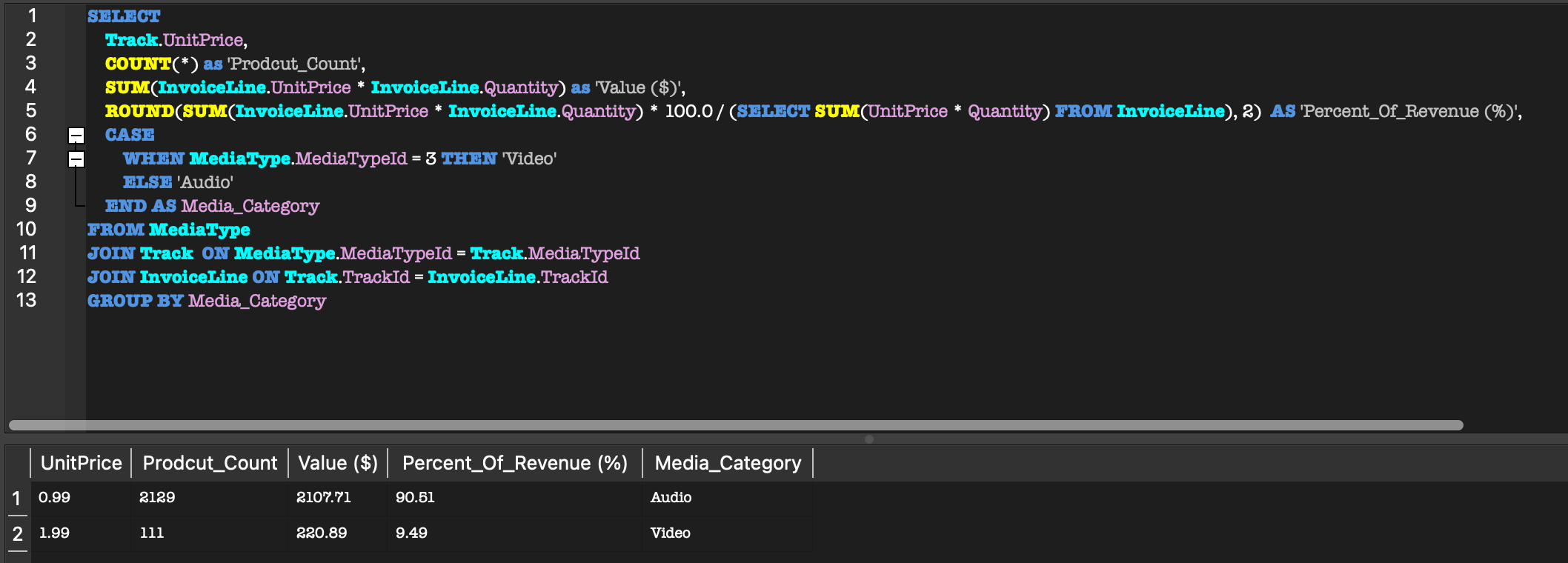
This selects the number of sales in each category, the total revenue for each media type, and each type’s share of all revenue as a percent rounded to 2 decimal places. A subquery calculates total revenue across all sales, which each category’s revenue is divided by to get its percent.
SELECT
    Track.UnitPrice,
    COUNT(*) AS 'Prodcut_Count',
    SUM(InvoiceLine.UnitPrice * InvoiceLine.Quantity) AS 'Value ($)',
    ROUND(SUM(InvoiceLine.UnitPrice * InvoiceLine.Quantity) * 100.0 / (SELECT SUM(UnitPrice * Quantity) FROM InvoiceLine), 2) AS 'Percent_Of_Revenue (%)',
Case
This is a simple if/else that labels each sale “Video” if its media type ID is 3 and “Audio” for any other ID. The labels go into a new column named Media_Category.
CASE
    WHEN MediaType.MediaTypeId = 3 THEN 'Video'
    ELSE 'Audio'
END AS Media_Category
FROM MediaType
Joining & Filtering
The joins connect MediaType to Track and Track to InvoiceLine through their shared ID keys, so each sale is connected to its media type. GROUP BY then combines all the sales into one row for Audio and one row for Video.
JOIN Track ON MediaType.MediaTypeId = Track.MediaTypeId
JOIN InvoiceLine ON Track.TrackId = InvoiceLine.TrackId
GROUP BY Media_CategoryThe result
Audio makes up most of the store's inventory (2,129 products) and revenue (90.51%).
| Media category | Percent of revenue | Product count | Value | Unit price |
|---|---|---|---|---|
| Audio | 90.51% | 2,129 | $2,107.71 | $0.99 |
| Video | 9.49% | 111 | $220.89 | $1.99 |
What are the top 5 highest grossing genres in the United States?
I compare revenue by genre to see which categories generate the most sales in the United States.
Selecting the relevant columns
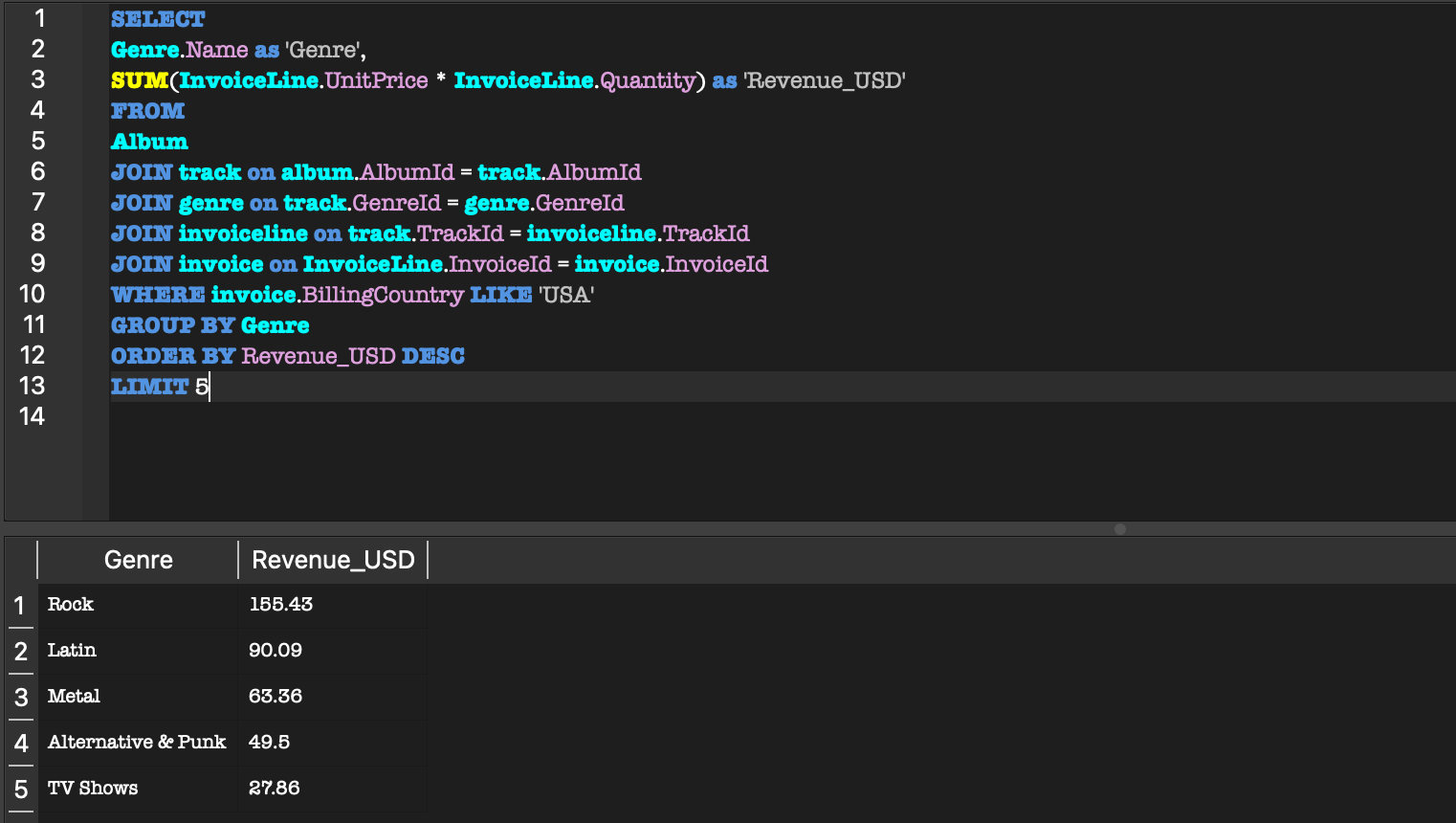
I select the genre name and use the aggregate function SUM to total revenue (unit price × quantity) for each genre.
SELECT
    Genre.Name AS 'Genre',
    SUM(InvoiceLine.UnitPrice * InvoiceLine.Quantity) AS 'Revenue_USD'
FROM Track
Joining
I join the tables by matching each foreign key to the primary key it references, linking the sales data back to the genre.
JOIN Genre ON Track.GenreId = Genre.GenreId
JOIN InvoiceLine ON Track.TrackId = InvoiceLine.TrackId
JOIN Invoice ON InvoiceLine.InvoiceId = Invoice.InvoiceId
Filtering
WHERE filters to US invoices only. GROUP BY collapses the rows into one row per genre. ORDER BY sorts genres by revenue, highest first, and LIMIT keeps the top 5.
WHERE Invoice.BillingCountry = 'USA'
GROUP BY Genre
ORDER BY Revenue_USD DESC
LIMIT 5;The result
Rock is the highest grossing genre in the United States with $155.43 in revenue.
| Genre | Revenue |
|---|---|
| Rock | $155.43 |
| Latin | $90.09 |
| Metal | $63.36 |
| Alternative & Punk | $49.50 |
| TV Shows | $27.86 |
Walkthrough
The database
Chinook is a digital media store database with 11 tables covering music, playlists, customers, employees, and sales.
lerocha / chinook-database (https://github.com/lerocha/chinook-database)